Delete Your Account
RESISTX (ABN 99 630 075 768)
You can delete your RESISTX account, and everything logged in it, from inside the app at any time. This page explains where to find it, what the app asks you before it goes ahead, and exactly what gets destroyed.
Deletion is immediate and permanent. There is no grace period, no cancellation window and no undo. Nothing is archived, and nobody, including our support team, can bring a deleted account back.
Before You Delete: Cancel Your Subscription
Deleting your account does not cancel a RESISTX subscription. An active one keeps charging you after your account is gone. Cancel it yourself first, in the place you bought it:
- Bought in the app on iPhone or iPad: Settings app → your name → Subscriptions → RESISTX → Cancel Subscription
- Bought in the app on Android: Play Store → profile icon → Payments and subscriptions → Subscriptions → RESISTX → Cancel subscription
- Bought on resistx.com: use the customer portal linked in your confirmation email. A website subscription cannot be cancelled from your App Store or Google Play settings, because the purchase was not made there. If you cannot find the email, contact support@resistx.com from the address on your account.
How to Delete Your Account
Option 1: In the app
- Open RESISTX and go to Settings.
- Under Data & Privacy, tap Privacy.
- Scroll to the bottom of the Privacy page, to Danger Zone, and tap the Delete account card.
- Read the summary. It lists what will be deleted, broken down by category, with the number of records held in each and a total.
- In the confirmation field, type DELETE MY ACCOUNT. It is case sensitive and must be in capitals. The button below stays disabled until what you type matches exactly.
- Tap Delete my account.
- A Last chance dialog appears. Tap Delete to go ahead, or Cancel to back out.
The deletion runs straight away. Your stored files go first, then your account and every record attached to it, and the app signs you out.
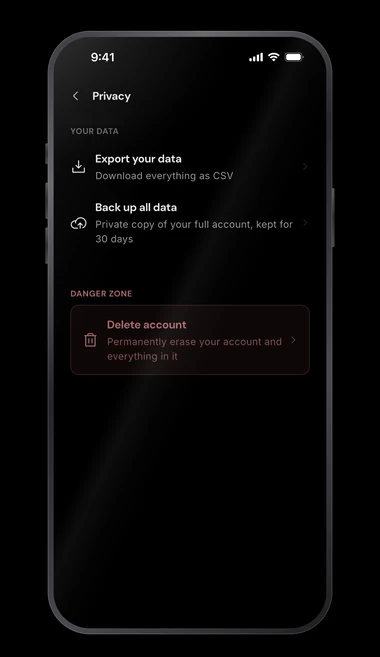
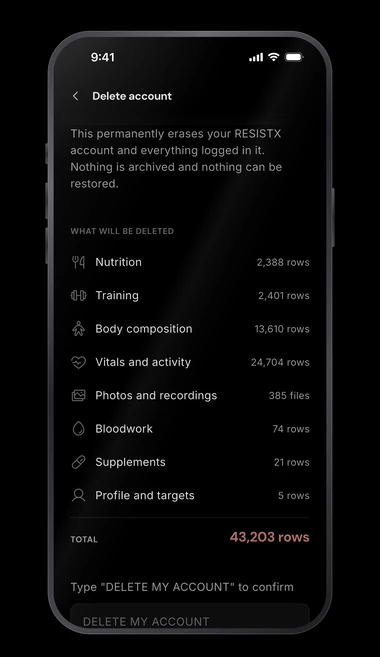
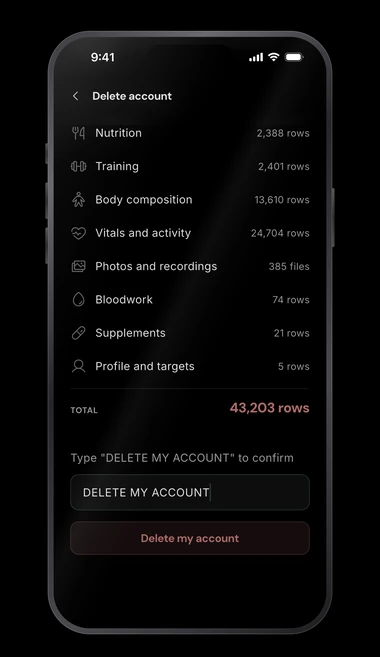
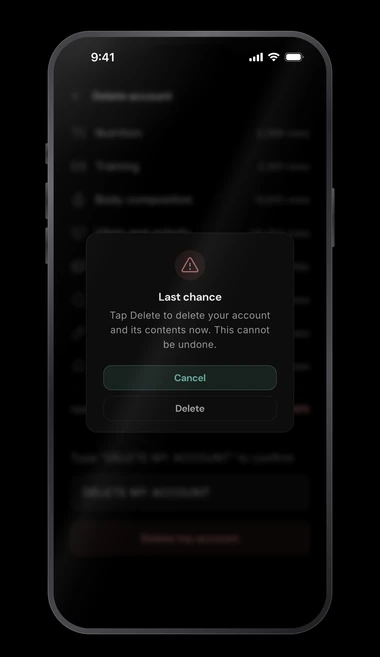
If you have been using RESISTX without an account, tap Delete my data in the sign out dialog. It opens the same confirmation page.
In earlier versions, Delete account sat in the Account section of Settings, directly below Sign out. It has moved to Privacy, and that section is now Sign out alone.
Option 2: By email
If you cannot get to the app, or you have already removed it from your device, email support@resistx.com from the address on your RESISTX account, using the subject line "Delete my account". We will verify the request and delete the account for you as soon as we can.
What Is Deleted
All of the following is destroyed permanently. Before you confirm, the app shows you how many records you are holding in each category.
- Nutrition: food logs, favourite foods, saved meals, recipes, hydration and your energy expenditure estimates
- Training: workouts, sets, personal records, check-ins, templates, programmes, custom exercises and rep quality analysis
- Body composition: bodyweight, measurements, imported DEXA scans, skinfolds and body fat estimates
- Vitals and activity: imported health and activity data, including sleep
- Photos and recordings: progress photos and filmed sets, counted as files rather than records
- Bloodwork: imported blood test results, panels, attachments and targets
- Supplements: protocols, doses, inventory and adherence history
- Profile and targets: your email address, display name, profile details, goals and app preferences
Any copy you made with Back up all data is stored under your own account, so it is deleted along with everything else.
What May Be Retained
- Anonymised, aggregated analytics: data stripped of everything that identifies you, which cannot be linked back to you. We use it only to improve the app.
- Legal and compliance records: anything we are required to keep by law, retained only for as long as the law requires.
Questions
If you have any questions about account deletion or your data, contact us at support@resistx.com.