Hevy vs Strong: what neither app does with your RIR

Search Hevy vs Strong and the first page of results is 5 micro-app blogs settling the same 3 axes: social feed against minimalism, Apple Watch, CSV export. They aren’t wrong. They stop at the surface of the log screen, which is where the training app comparisons on this site start rather than finish.
The question a self-coached lifter hits comes after the download. The effort field is on, you logged RPE 8, roughly RIR 2, and the set is saved. So what happens to that number?
In a log, nothing. It sits there.
Hevy vs Strong: which one should you actually use?
Use Strong if you want the quietest notebook and you already know your program. Use Hevy if you want a feed and people in it.
Strong’s own site advertises supersets, custom exercises, CSV export, Apple Health, a warm-up calculator, Siri Shortcuts, RPE, body part measurements, workout scheduling and a muscle heat map, and lists iPhone, Android and Apple Watch as its platforms. It’s a solo lifter’s tool kit, stated plainly. Hevy is the social one: its Android app opens on a feed, suggests athletes to follow, and supports sharing sessions.
The choice matters less than the search volume suggests. Both are logging tools. Whether the training worked is decided by how many hard sets each muscle got and how close to failure they were, and a log will hold both of those numbers without ever scoring them.
What’s actually different between Hevy and Strong?
The log screen is almost identical: sets, reps, load, rest timer, templates, per-exercise history, and an effort field. The difference is posture. Strong sells a solo workflow around CSV export and Apple Watch support, while Hevy sells a social layer around that same log.
| Hevy | Strong | RESISTX | |
|---|---|---|---|
| What it tracks | Training, body weight, body fat, lean body mass, circumference measurements and progress photos | Training, body weight, body fat, caloric intake, daily macros and circumference measurements | Everything Hevy and Strong track, plus full nutrition, body composition, bloodwork, sleep, supplements and protocols |
| Per-set effort field | RPE, optional, per set | RPE from 6 to 10, optional, per set | RIR, 0 to 10, required per set, plus per-workout RPE |
| Weekly sets per muscle and configurable MEV, MAV, MRV landmarks | Counts sets per muscle group and shows muscle-distribution views; no configurable landmarks found | Vendor-advertised muscle heat map; no set-count or configurable landmark controls found in the Android app | Counts weekly working sets and places every muscle in a user-configurable zone |
| Imports history from another app | Imports a Strong CSV | No history-file import found | Imports Hevy, Strong, FitNotes, Fitbod, Jefit and Alpha Progression |
| Platforms | iPhone, Android, Apple Watch and Web | iPhone, Android, Apple Watch | iPhone, Android and Apple Watch |
The app checks above were performed on Android on 2 September 2026. Platform coverage also uses each vendor’s first-party product and help pages.
What do you actually do with an RIR number?
Trust it near failure and discount it further out. RIR and RPE are the same scale read from opposite ends: 10 RPE equals 0 RIR, and 9 RPE equals 1 RIR. Having the field at all is table stakes rather than a feature.
The number is biased in one direction. Steele et al. had resistance-trained lifters stop at their self-determined rep max, then took them to true momentary failure on another day: they completed 2.0 more reps, 95% CI 0.0 to 4.0. The 2 experiments disagreed, which is the honest version of this. Experiment 1, 14 lifters, put the gap at 0.8 reps with a 95% CI from minus 0.26 to 1.8. Experiment 2, 24 lifters, put it at 2.8 reps, 95% CI 1.5 to 4.0.
The call gets sharp close to the limit. In Helms et al., experienced squatters’ judgements carried a standard deviation of 0.32 at 100% of 1RM and 1.18 at 60%. Your RIR 1 is worth logging. Your RIR 4 is a guess with a range on it.
Experience doesn’t rescue it either, at least on machines. Across 27 men and 31 women doing biceps curls, triceps pushdowns and seated rows at 72.5% of 1RM, neither training experience (p = 0.462) nor sex (p = 0.917) predicted the error. Proximity to failure and set number did.
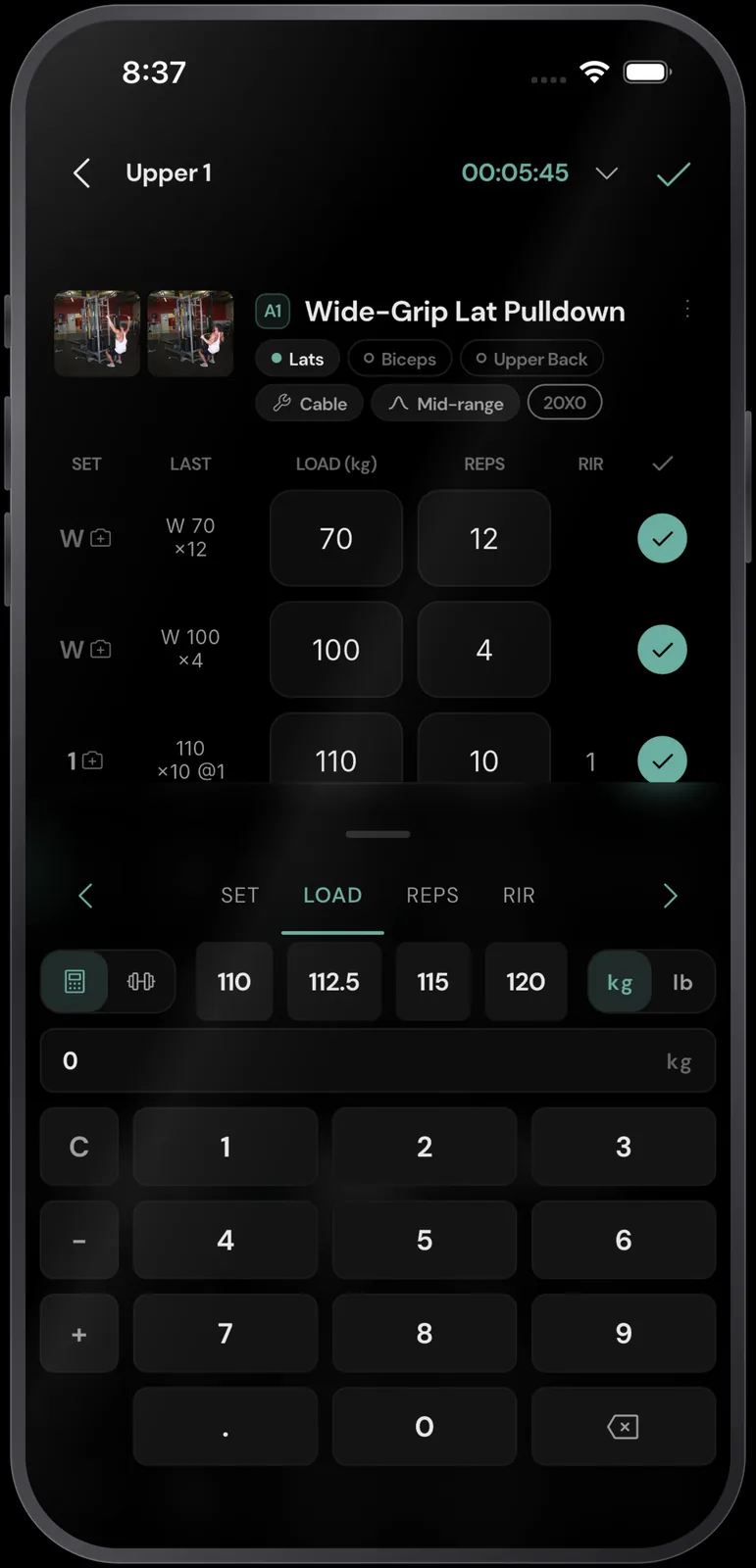
Log the number anyway and read it as a spread rather than a single reading, just like recording proximity to failure set by set instead of once per session. In RESISTX, RIR is required for every set as an integer from 0 to 10, and you can also set an RPE for the workout. A newly added exercise starts at 3 working sets of 10 at RIR 2.
How many sets per muscle per week should you be counting?
Compare weekly working sets per muscle against your own landmarks. Pelland et al. pooled 67 studies and 2,058 participants showed a posterior probability of a positive weekly-volume slope at 100% for both hypertrophy and strength, with diminishing returns that bite considerably harder on strength than on size.
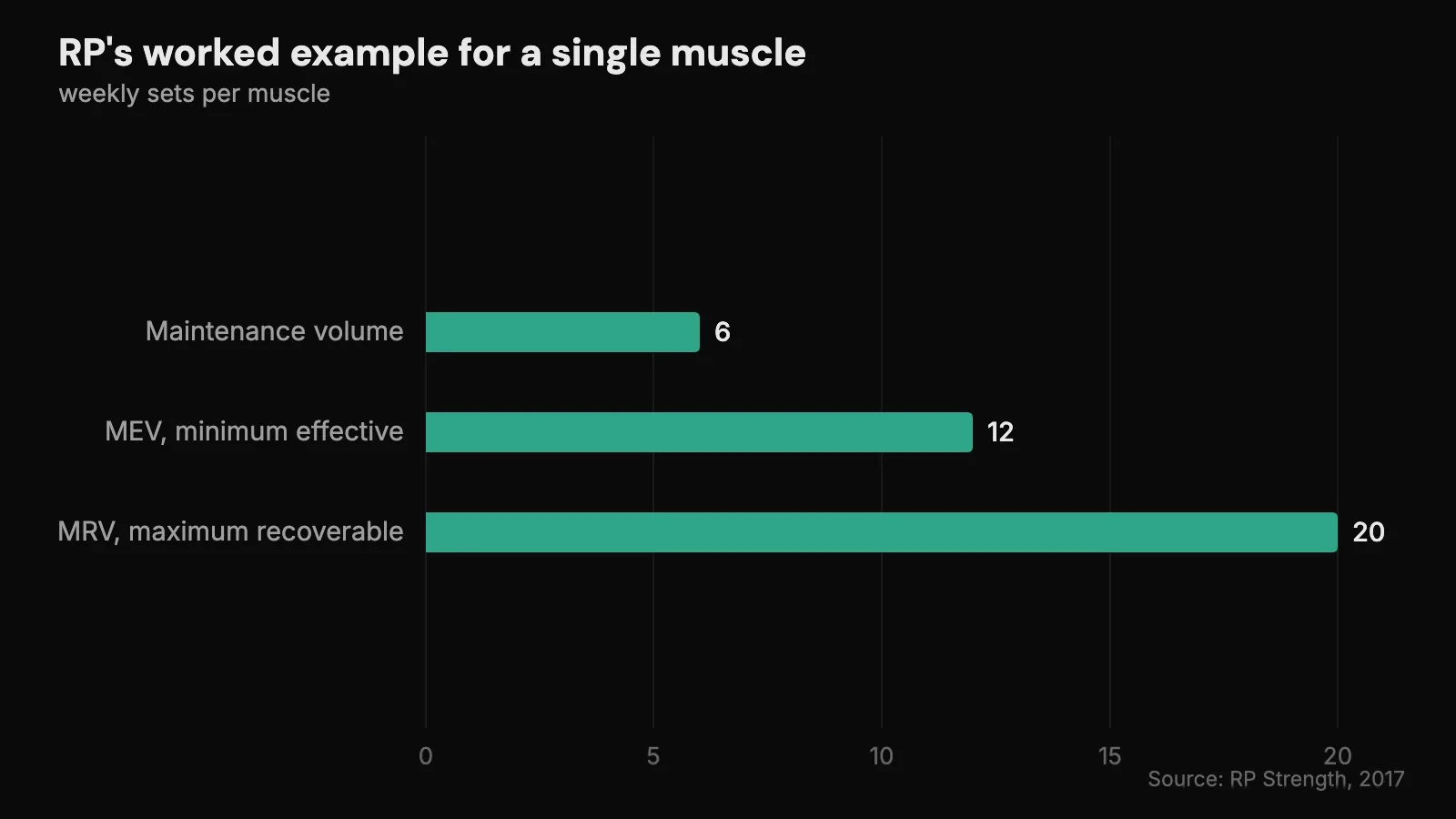
That curve is what the landmarks describe. RP Strength defines Minimum Effective Volume as “the lowest amount of training that actually grows muscle” and Maximum Recoverable Volume as “your upper limit”, above which recovery stops keeping pace. Their worked example runs a single muscle from MEV 12 sets to MRV 20 across a mesocycle, with roughly 6 working sets a week as maintenance, and their own page stresses that those figures are individual and exercise-dependent. Don’t copy them. Go and find your own volume landmarks.
RESISTX scores weekly sets per muscle against MEV, MAV and MRV zones and counts working sets only, warm-ups excluded. Each program day tab carries live per-muscle counts as exercises and sets go in, so the week’s number moves while you’re still building it. The stance underneath the maths is to start at the minimum effective dose and add volume only when the logged data shows the last dose was absorbed.
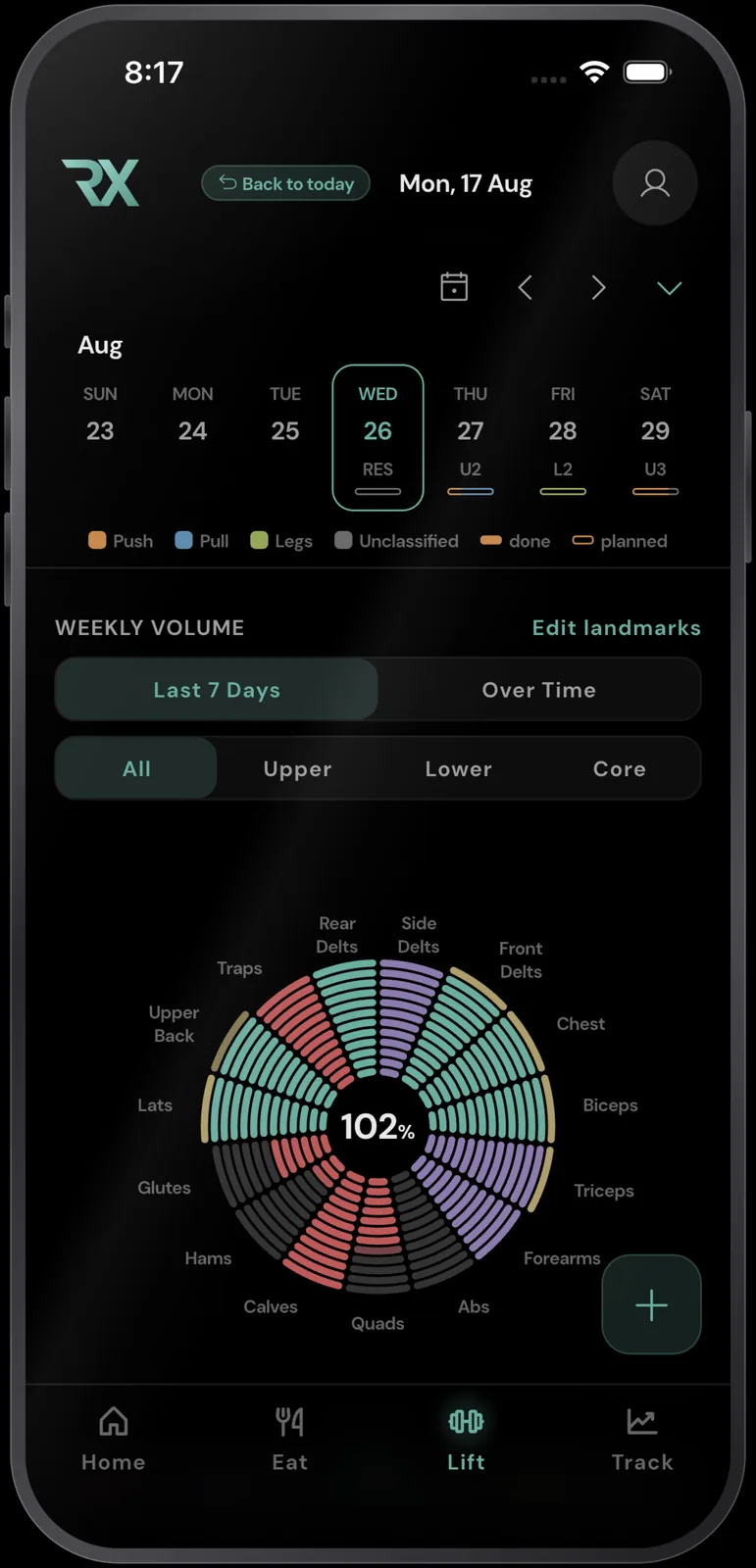
The counting rule matters as much as the total, because a lat pulldown isn’t only lats and a row isn’t only upper back. Getting your sets per muscle group per week counted consistently comes before arguing with a landmark.
Can you move your training history out of Hevy or Strong?
Yes. Strong exports workout data to CSV, and Hevy exports both workout and measurement data. Hevy can also import a Strong CSV directly. Strong’s help centre says its exported files cannot be imported back into Strong, and no history-file import appeared in the Android app.
RESISTX imports workout history from Hevy, Strong, FitNotes, Fitbod, Jefit and Alpha Progression, so switching doesn’t restart your logbook at zero.
“I’ve always kept a parallel log to my coach’s log, because I feel like all the coaching apps, they’re just kind of like data black holes. I want to do stuff with the data, and the only way to do that was to make sure I owned it. If you want to leave the app, fine, we’ve built a full data export, so you can take literally every single data point you have logged about yourself with you.”
Import is a first-class onboarding path in the app rather than a settings-screen afterthought: choose import, pick the source, confirm, and the history lands in a program you can edit.
What do Hevy and Strong both leave out?
Most of the feedback loop outside training. Calling either app “training only” is too broad: both track body measurements, and Hevy’s Android app exposes weight, body fat and lean body mass alongside its workout history. Strong records weight, body fat, caloric intake and circumference measurements, and offers dashboard widgets for weekly calories and daily macros. Those are useful outcome and intake signals.
What neither app provides is the whole system for optimising body composition: a complete food log with adaptive intake, sleep and recovery context, bloodwork, supplements and protocols, body-composition trends, and training dose on one feedback loop. A stalled bulk is a question about weekly volume, intake and the weight trend at once, and separate tools that don’t share a timeline will each report that their half looks fine.
RESISTX holds training in the same app as nutrition, body comp from DEXA, skinfold and BIA readings fused together, bloodwork read from any lab PDF, sleep, supplements and protocols, with two-way Apple Health and Health Connect sync. Most training logs give you nowhere to import a DEXA scan PDF, so the scan you paid for sits in a folder instead of next to the weekly sets that produced it.
Bottom line
Hevy versus Strong comes down mostly to taste. Choose Hevy if a social feed makes you more likely to train, or Strong if you want a quieter notebook. Both take useful, capable approaches to the training loop.
But that comparison answers the wrong question when the goal is to optimise body composition. The question is whether either app supports the complete system and feedback loop needed to build the best physique you can: training dose, effort, nutrition, recovery, body-composition outcomes and the health context that explains why those outcomes moved.
Neither does. Each handles the training slice well and leaves most of the rest unanswered. If you rely on that slice as the whole system, you can execute good workouts while missing the signals that tell you whether to change volume, food, recovery or the wider plan. That is where gains are left on the table.
Questions people ask
Is Hevy or Strong better for bodybuilding?
Neither one settles it. A hypertrophy lifter needs weekly hard sets per muscle checked against a landmark. Hevy counts sets per muscle group, and both apps visualise trained muscles, but the Android app checks found no user-configurable MEV, MAV or MRV landmarks in either one. Pelland et al.’s 67 studies and 2,058 participants make the weekly set total the number with the strongest evidence behind it. Pick the log you’ll actually open, then track the sets somewhere that grades them.
Does Hevy track RPE and RIR?
Hevy tracks optional RPE per set. Its Android workout screen shows an RPE control on every set row, and completed history on the same screen preserves values such as 6, 9.5 and 10 RPE. It does not present the field as RIR. The scale itself is settled: RPE and RIR describe the same proximity-to-failure idea from opposite ends. The caveat is precision. Judgements at 100% of 1RM carried a standard deviation of 0.32, against 1.18 at 60%.
Do I need a separate app for nutrition if I use Hevy or Strong?
Yes, for meal logging. Both apps can hold body measurements. Strong can record caloric intake, display daily macros and receive nutrition data through Health Connect, but it does not replace a food log with an adaptive nutrition loop. The cost is reconciliation rather than the extra icon on your home screen. When a cut stalls, you need weekly sets, intake and the weight trend on one timeline to work out which of the 3 moved, and 2 apps that don’t talk will each defend their own half.
Can I import my Strong or Hevy workouts into another app?
Yes. Strong and Hevy both export workout data, and Hevy imports a Strong CSV. RESISTX imports Hevy, Strong, FitNotes, Fitbod, Jefit and Alpha Progression workout history.